ROB RUN Wipe Schedule: Check Your State’s Reset Time
When does ROB RUN wipe? Find your State ID, read Lifetime, check the seven-day Federal Raid rule and convert a confirmed reset time. See what you keep.
Last updated: 2026-11-19
Match your State ID first. Read Lifetime in the game, then check an announcement for that state. Kefir gives a seven-day cycle, not one confirmed global reset hour.
When does ROB RUN wipe?
The official Federal Raid article gives a seven-day cycle. It does not establish a global weekday, a fixed hour, or the starting point of your particular state’s cycle. A game release date plus seven days is not a verified deadline for every server.
Your state’s exact next reset is not verified here. The homepage gives the planned times for newly opening servers. Check a Federal Raid notice for the reset of the state you already play on.
Before you plan around a wipe
- 1 · Find the correct row
Open State Selection and match ID + NAME. See the screenshot below; do not substitute your player UID.
See the state screen ↓ - 2 · Read the right kind of time
Record the Lifetime value and when you checked it. A duration, a regional opening clock and a confirmed wipe timestamp are different things.
- 3 · Choose your next step
Have a dated announcement for your state? Convert its stated time below. Only have Lifetime? Check the game or official notices before treating a date as confirmed.
Convert a confirmed notice ↓Read official announcements ↗
How to check your own state’s time
Use this quick check before entering a time:
- The notice covers your state or its stated launch group and gives a date, time and time zone. Enter that timestamp in the converter below. For example, Kefir’s November 11 notice covered states launched on November 4. If your state launched November 5, that notice gives you no date.
- The list only shows Lifetime, or the notice covers a different group. Leave your next reset time unconfirmed and save the State ID for the next notice.
Convert a confirmed wipe time
Have a state-specific date and time? Convert that published timestamp here. This does not discover or estimate your next wipe.
Use the offset for that date, not just “ET” or “European time”. These inputs stay on your device; this site does not verify the notice.
Find your State ID and Lifetime in the server list
The following are published gameplay screenshots, inspected November 14, not our own play session or a current server feed. Game UI © Kefir; screenshot source: XBoosty’s illustrated guide. The displayed build is 0.7.0.4017; later interfaces can differ.
State Selection: identify the row before reading Lifetime
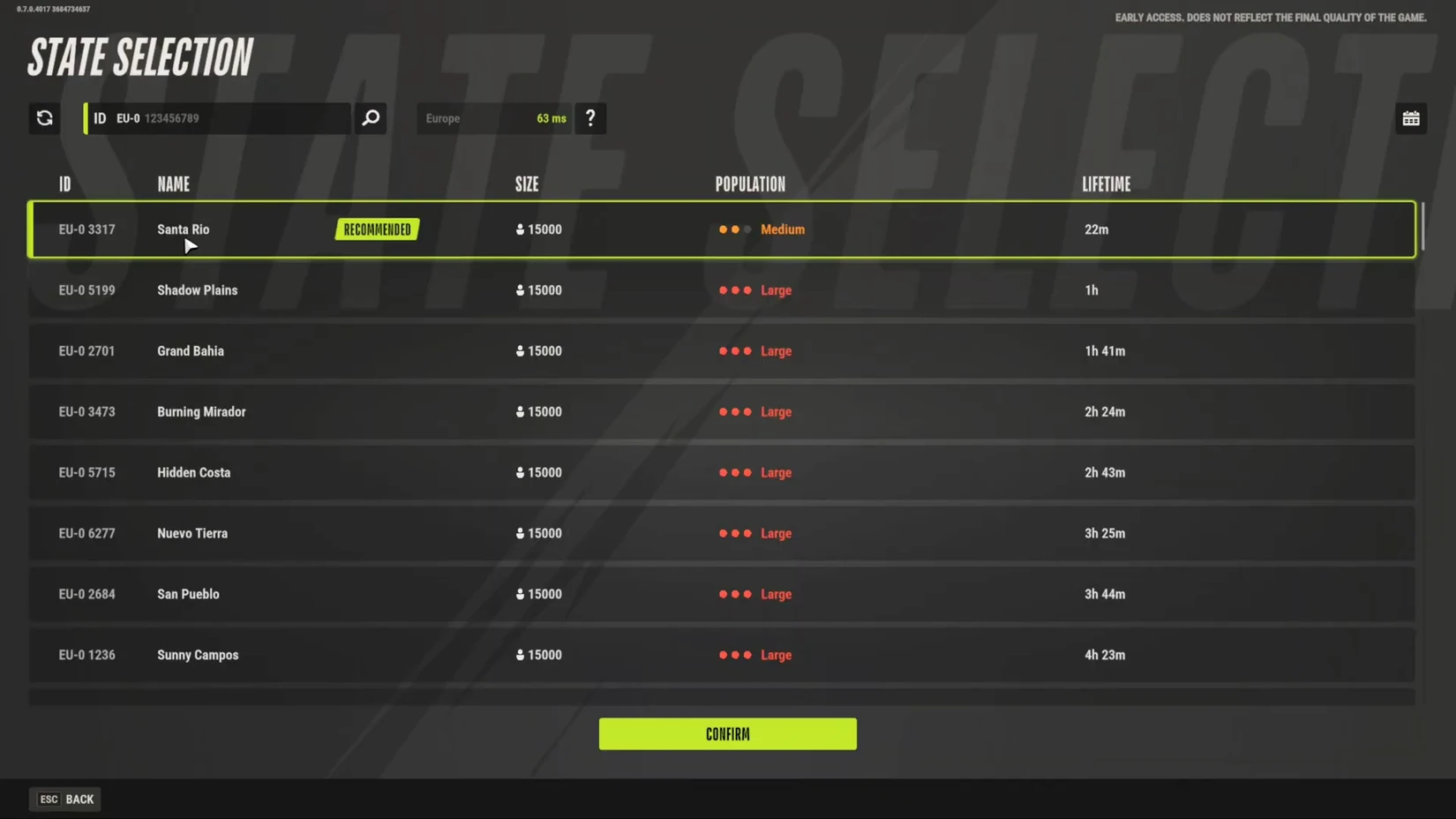
Historical State Selection screen. Read the state ID and Lifetime together; 22m is not labelled as a wipe countdown.
- Read the ID and NAME on the same row. In this image, Santa Rio is EU-0 3317; that is a state identifier, not your player UID.
- The LIFETIME column shows an age-like duration: Santa Rio shows 22m, Shadow Plains 1h. This screenshot does not label it “time until wipe”. Do not report 22 minutes as a reset deadline.
- POPULATION and SIZE are historical screen values. They do not establish current vacancies or a live capacity list here.
- The image shows a calendar icon, but it does not show what clicking it does. We cannot document that as a verified wipe-timer path. Match a current state-specific notice before using the time converter.
What is wiped, and what carries over?
Moving regions? The November 17 patch confirms Battle Pass progress and points carry over during a region switch. Use the transfer guide for that move and the rules below for a Federal Raid.
Reset / converted
- Plots and bases
- Weapons and cash
These are converted into jail time and authority, according to the help article.
Carry over
- Cosmetics and player name
- Tutorial progress and settings
- Accumulated jail time
This is a summary of the written rule, not an inventory-by-inventory audit. The FAQ does not list every item subtype or give a conversion formula. Do not assume that an unlisted item is protected.
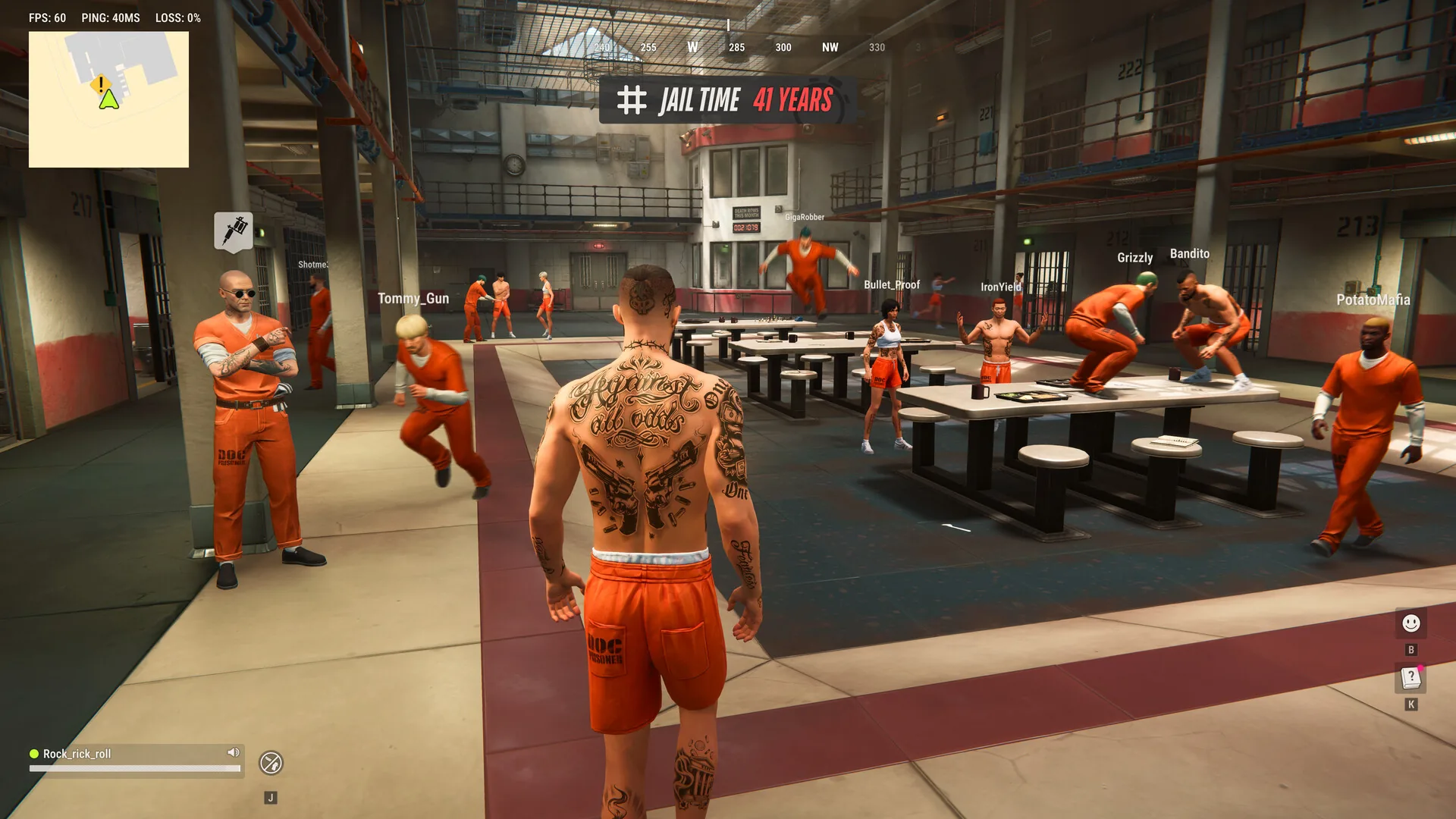
Official Kefir / Steam prison screenshot. It illustrates the setting and jail time, not a live wipe countdown or proof of your next reset.
Kefir / Steam ↗
Court Ruling: check Sentence Type before calling it a wipe
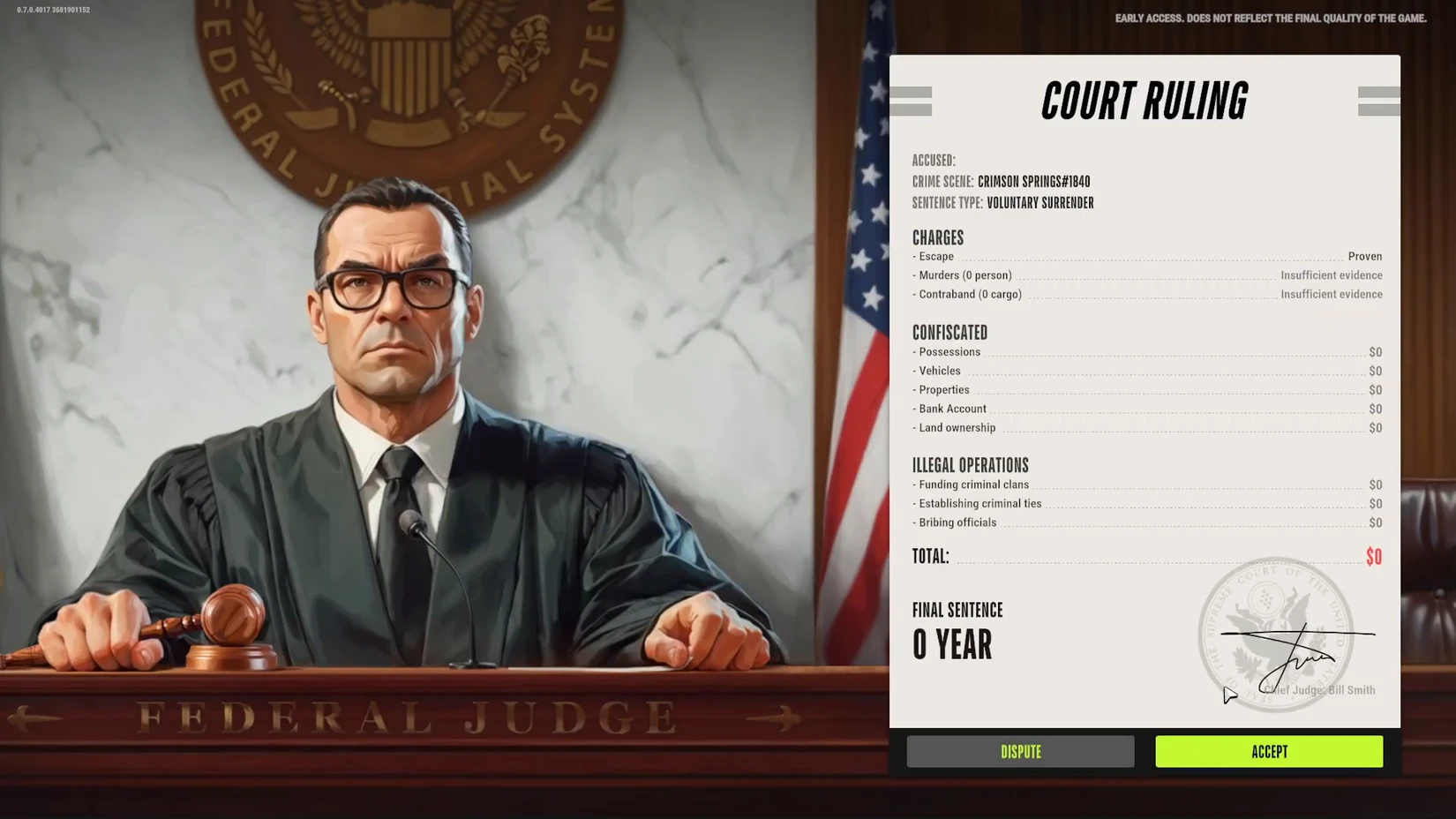
Voluntary Surrender, not a weekly-wipe capture. Read Sentence Type before comparing losses.
This image explicitly reads SENTENCE TYPE: VOLUNTARY SURRENDER. Its Confiscated section lists possessions, vehicles, properties, bank account and land; the shown values are $0. It demonstrates a surrender screen, not an observed weekly wipe, an automatic jail-time formula or a reason to surrender before a reset. The scheduled-wipe rules come from the official notice below.
Verified records: first wipe, rollback and surrender
Recorded ruling: read Sentence Type before the number
In a November 12 gameplay clip published by Laitilee, the visible Court Ruling reads Arrest and Final Sentence: 26 years. The clip is edited and presented as a Federal Raid highlight. This frame records one ruling, with no continuous record of the state, game build or jail time before and after the raid.
When comparing your own screens, record the State ID and displayed time before reset, then copy the exact Sentence Type and Final Sentence from the ruling. Apply Kefir’s announced time only if the notice covers your state. One recorded ruling cannot supply the next reset time or a general conversion rate.
If you want to check an actual wipe, capture the state and inventory or property before reset, then capture the same state, the ruling and those same categories after reconnecting. A State ID plus matching before-and-after screens lets you distinguish a wipe from a transfer or an unrelated arrest.
Officially announced first wipe · November 11
Kefir’s November 11 announcement, published at 15:54 UTC, covered states launched on November 4. It scheduled their first wipe for (20:00 Moscow time). That was 18:00 Berlin, 12:00 New York and November 12, 01:00 Shanghai. These are one instant, not different regional wipe appointments.
This is a verified announcement, not our observation that every state completed the wipe at that moment. It does not confirm the next reset of a state opened on another date. For the converter, this historical example is 2026-11-11 17:00, UTC +00:00; do not use it as your future deadline.
The post explicitly includes laundered money, items, vehicles, real estate, land, unlocked tree items, recorded clan spending and bribes in confiscation / sentence conversion. It preserves cosmetics, B-coins, appearance, name, tutorial, settings and accumulated jail time. There is no conversion formula in that post. These details extend the shorter FAQ list above; they do not establish the losses for voluntary transfer.
Officially acknowledged rollback · November 9
The developer’s status update acknowledges progress rollbacks after server crashes. If progress disappeared, that admission alone cannot diagnose your account. Official lost-progress help says to check for a wipe and the correct Steam account, then provide support with UID, name and approximate time if the loss is unexpected. Send those privately to Kefir, not to this site.
Visible surrender example · source image inspected November 13
The Court Ruling above says Voluntary Surrender. It is a documented example of a different event, not evidence that the weekly wipe was avoided or that surrender is required to earn authority. Keep those claims separate when comparing advice.
Wipe, new opening, outage and transfer are different
| Event | What it tells you | Next step |
|---|---|---|
| Federal Raid | The documented seven-day progress reset. | Check the affected state and reset notice. |
| New server opening | A planned opportunity to start on another state, not a reset of yours. | Use the opening board, then verify the game list. |
| Maintenance / loading failure | Access may be interrupted; failure alone does not prove a wipe. | Use the status and error checks. |
| Voluntary transfer | A move to another server through Prison; its full losses are not listed in the transfer FAQ. | Read the transfer precautions. |
Before a reset you have confirmed
Agree on your next session and review what the official rule preserves. Do not spend on a long plan on the assumption that cash or a base will survive. This is planning advice, not a measured best strategy or a way to bypass the reset.
Kefir’s banking help describes laundering as theft protection until the next wipe. That wording is not evidence of a wipe exemption. See the banking guide for the money flow.
Common questions
Does everyone wipe at the same moment? The linked official FAQ does not confirm that. This site has no state-by-state reset feed.
Does a disconnect mean my progress was wiped? No such conclusion follows from a failed connection. First check connection evidence; if progress is missing, record the state and ask support rather than assuming the cause.
Can the squad planner remind me of a wipe? Its calendar export is for a planned new opening. It is not a verified reminder for your existing state’s reset.
Sources and scope
Official Federal Raid, banking and transfer help rechecked November 12, 2026; the November 4 opening announcement distinguishes new openings from resets. No live game account, conversion formula or exact next wipe timestamp was tested. Send a correction with a current official source; keep private identifiers out of the site form.
A practical before / after reset checklist
Before: compare the state, original date and source time zone with your group. Keep a private note of the old state so that joining a different world is not mistaken for missing progress. Do not plan on cash or a base surviving.
After: check the state and account before reporting unexpected losses. Record the time, missing progress and the exact message for official support. For the next session, use the friend-transfer checks and the beginner guide. These are planning steps, not a recovery guarantee.